
It’s 11:47 PM. You’re staring at a nested VLOOKUP that worked yesterday but now returns #REF! errors across three tabs of your quarterly forecast. The board presentation is in nine hours. You’ve spent forty minutes tracing cell references and still can’t find where the break occurred. Every financial analyst knows this moment—the creeping dread when a formula you trusted betrays you at the worst possible time.
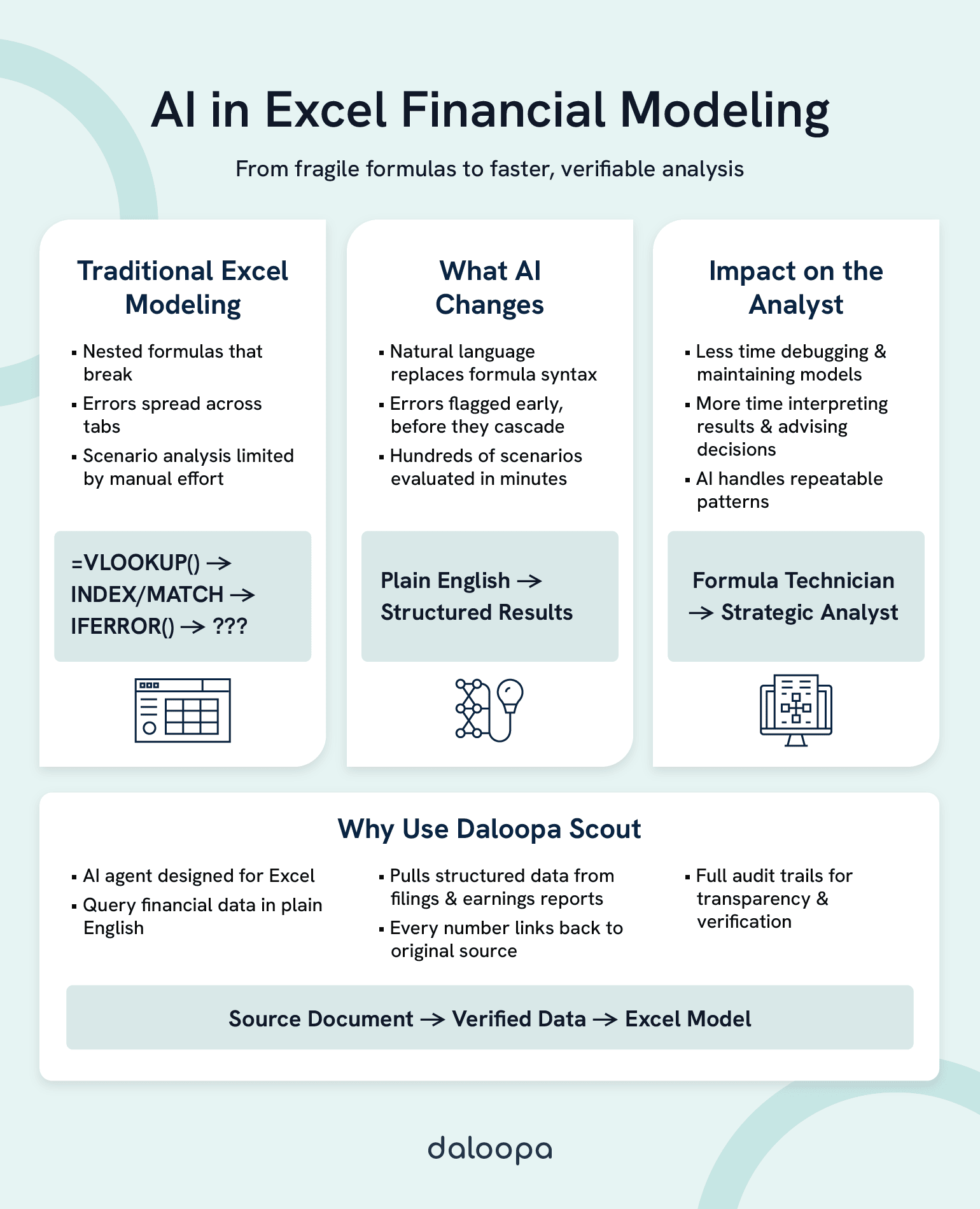
AI transforms Excel financial modeling by replacing fragile lookup-and-reference formulas with natural language queries, auto-generating complex formulas from plain-English descriptions, detecting errors in real-time before they cascade, and automating scenario analysis that would otherwise require hours of manual reconfiguration. The result: less time debugging formula mechanics, more time on interpretation, judgment, and strategic recommendations that actually move the business forward.
This shift happens across three core transformations. Natural language interfaces let you ask questions of your data instead of constructing formulas. AI-powered error detection catches problems before they propagate, not after you’ve presented flawed numbers to the CFO. Intelligent scenario analysis runs hundreds of assumption combinations in the time it takes to manually adjust five cells. None of this replaces your financial expertise. It amplifies it, freeing you to do the work that spreadsheets never could.
Key Takeaways
- Natural language replaces formula syntax: Query financial data conversationally—”Show me Q4 revenue for Northeast accounts”—instead of constructing multi-function formulas that take fifteen minutes to interpret.
- Error rates in spreadsheets are higher than you think: Research shows cell error rates during development average 1% to 5%, and field audits found errors in 91% of spreadsheets examined. AI-powered error detection catches these problems at their source.
- Scenario analysis scales from hours to minutes: Five variables with three values each create 243 combinations. AI evaluates all of them systematically while identifying which assumptions drive the most variance.
- AI amplifies expertise rather than replacing it: The productivity gain comes from automating formula work that follows recognizable patterns, freeing your judgment for the work that genuinely requires human intelligence.
- Audit trails and transparency matter: Trustworthy AI tools show the formula, cite the source, and make verification straightforward—”the AI did it” is never an acceptable explanation.
To understand why these capabilities matter, we need to examine why traditional Excel modeling still hits fundamental walls despite decades of improvements.
Why Traditional Excel Modeling Hits a Wall
The Hidden Cost of Formula Complexity
Consider a revenue model with twelve interconnected tabs: actuals feeding assumptions, assumptions driving projections, projections rolling up into consolidated views. Changing one growth rate assumption requires updates across forty-seven cells. Miss one, and your model breaks silently—returning plausible-looking numbers that happen to be wrong.
The formula that seemed elegant six months ago now looks like this:
=IFERROR(INDEX(Data!$B$2:$B$1000,MATCH(1,(Data!$A$2:$A$1000=A2)*(Data!$C$2:$C$1000=”Q4″)*(Data!$D$2:$D$1000>=DATE(2024,1,1)),0)),””)
Five nested functions. Multiple criteria. Error handling wrapped around the whole thing. Even experienced analysts need fifteen minutes just to interpret formulas of this complexity—time that compounds across every maintenance cycle.
Then there’s the knowledge concentration problem. When one analyst builds a critical model, they become the only person who truly understands its architecture. When they leave, get promoted, or go on vacation during close, the team inherits a black box. The formula logic exists in the spreadsheet. The reasoning behind structural choices—why this lookup instead of that one, why hardcoded dates in row 47—exists only in someone’s memory.
Error Rates That Undermine Confidence
Research by Raymond Panko at the University of Hawaii has studied spreadsheet errors for over two decades. The findings are sobering: cell error rates during development average 1% to 5%.¹ That sounds small until you do the math. A spreadsheet with 2,000 formula cells at a 2% error rate contains approximately 40 errors. Because formulas chain together, even a modest error rate virtually guarantees that any large spreadsheet will contain at least one material error affecting bottom-line calculations.
Field audits using rigorous methodologies found errors in 91% of the spreadsheets examined, with studies only reporting substantive errors significant enough to impact bottom-line calculations.² In finance, where decisions hinge on model outputs, the stakes are comparable. A single misplaced cell reference can invalidate a week of analysis, and you may not discover it until you’re defending numbers you can no longer trust.
The insidious part: errors rarely announce themselves. A broken VLOOKUP wrapped in IFERROR returns zero instead of #N/A. A date stored as text sorts incorrectly without triggering any warning. These silent failures create what researchers call “latent errors”—problems waiting to surface during maintenance, what-if analysis, or the moment you’re least prepared to handle them.³
The Scalability Ceiling
Excel handles remarkable scale. Models with 100,000 rows and dozens of tabs function daily in finance teams worldwide. But performance degrades in ways that constrain analysis. A VLOOKUP across a large dataset takes several seconds per calculation. Multiply that by thousands of cells, and recalculation alone consumes minutes. Volatile functions—INDIRECT, OFFSET, TODAY—recalculate on every change, compounding the slowdown.⁴
Version control creates parallel friction. Five analysts working from the same model produce five divergent versions within a week. Which contains the latest assumptions? Which accidentally broke the margin calculation? Reconciling “FY25_Forecast_FINAL_v3_JM_edits_FINAL2.xlsx” with “FY25_Forecast_FINAL_v3_SK_reconciled.xlsx” becomes its own time sink.
The paradox sharpens as models mature: the more valuable a model becomes to the organization, the more fragile and expensive to maintain it grows. Excel itself isn’t the problem—it remains remarkably capable. The constraint is the manual processes layered on top.
These limitations aren’t reasons to abandon Excel. They’re exactly the gaps that AI-powered tools are designed to fill.
How AI Eliminates Formula Complexity
From Formula Syntax to Natural Language Excel
Imagine replacing that twelve-function nested formula with a question: “Show me Q4 2024 revenue for accounts in the Northeast region where the deal closed after January 1st.”
AI-powered tools parse natural language, identify relevant data structures, and generate appropriate formulas or return results directly. You describe intent; the system handles implementation.
Before:
=IFERROR(INDEX(Data!$B$2:$B$1000,MATCH(1,(Data!$A$2:$A$1000=A2)*(Data!$C$2:$C$1000=”Q4″)*(Data!$D$2:$D$1000>=DATE(2024,1,1)),0)),””)
After: “Show me Q4 revenue for [company name]”
This transformation matters most for the formulas you use occasionally—complex enough to require documentation lookup, infrequent enough that you never commit the syntax to memory. Rather than spending fifteen minutes constructing and testing an array formula, you describe what you need and validate the result.
Daloopa has built this capability into Scout, an Excel AI agent that lets analysts query financial data conversationally, pulling verified figures from SEC filings, earnings reports, and company documents without constructing formulas at all. The data arrives structured for modeling, with source citations intact.
Intelligent AI Formula Generation
Natural language alone wouldn’t satisfy skeptics—rightfully so. The real value emerges when AI understands context well enough to generate appropriate formulas, not just retrieve data.
Modern implementations analyze your existing model structure: column headers, data types, naming conventions, calculation patterns. When you ask for “year-over-year growth rate,” the system recognizes which columns contain dates, which contain values, and how your model typically handles percentage calculations. It generates a formula consistent with your existing patterns rather than imposing a generic approach.
Edge case handling separates useful AI from frustrating AI. Blank cells, mismatched data types, circular references, division by zero—these mundane problems consume debugging time. Competent AI tools handle them automatically, wrapping calculations in appropriate error handling and flagging structural issues before they cascade.
Can AI really understand your specific model structure? Not always, and not perfectly. AI excels at common patterns—lookups, aggregations, time-series calculations—where training data is abundant. Highly custom logic or unusual data structures may require manual intervention. The productivity gain comes from automating the substantial portion of formula work that follows recognizable patterns, freeing your attention for the work that genuinely requires human judgment.
See how Daloopa Scout lets you query financial data in plain English—no formulas required.
Catching Errors Before They Cascade
Real-Time Error Detection
The traditional error discovery process is reactive: something looks wrong in a report, you trace backward through cell references, and eventually you find a broken link or mistyped value. By then, the error has already propagated—potentially into outputs that informed decisions.
AI-powered error detection inverts this sequence. Instead of waiting for symptoms, the system analyzes model structure continuously and flags problems at their source.
Consider this scenario: you change a date format in cell B7 from “2024-01-15” to “01/15/2024” to match a report template. In a traditional workflow, you might not notice that this text-formatted date broke the DATEDIF calculation in G7, which fed into the aging calculation in tab 3, which rolled up into the summary that feeds the board deck. The error surfaces—if it surfaces at all—as “the numbers look off” three tabs away.
AI detection identifies the structural break immediately: “Changing B7 will affect 23 dependent formulas across 3 worksheets. 4 of these may produce unexpected results due to data type mismatch.” You see the impact before saving the change, not after distributing the file.
Pattern recognition extends beyond structural breaks. AI can identify statistical anomalies—a revenue figure that’s 10x higher than historical patterns, a negative value in a column that should only contain positives, a growth rate that implies a mathematical impossibility. These aren’t formula errors. They’re data quality issues that traditional validation rules miss because no technical constraint has been violated.
Validation Against Source Data
Manual data entry introduces error at the point of transcription. You’re copying figures from an SEC filing into a model, and somewhere in the process, a number shifts: $847 million becomes $874 million. The model calculates correctly from that point forward—correctly wrong.
AI tools that integrate with source data cross-reference model inputs against original documents. When you enter a revenue figure, the system checks whether that number appears in the cited source. Discrepancies generate alerts, not because the formula is wrong, but because the input may not match reality.
Daloopa Scout maintains complete audit trails from source document to model input. Every figure links back to its origin—the specific page of the 10-K, the exact table in the earnings release. When leadership asks “where did this number come from?” you don’t reconstruct your research process from memory. You show them the source with one click.
With formula complexity tamed and errors caught early, analysts can finally tackle the work that actually requires human judgment—scenario analysis and strategic forecasting.
Powering Scenario Analysis at Scale
Dynamic Sensitivity Analysis
Traditional sensitivity analysis follows a familiar pattern: set up a data table with two input variables, let Excel calculate the matrix of outcomes, repeat for additional variable pairs. Testing how five key assumptions interact across their reasonable ranges requires multiple data tables, manual orchestration, and careful tracking of which results correspond to which inputs.
The mathematics constrain ambition. Five variables with three possible values each (low, base, high) create 243 unique combinations. Testing each manually would consume an entire day. Most analysts settle for testing a handful of scenarios that seem important, accepting that they may miss critical interactions.
AI transforms this constraint. Rather than manually configuring each scenario, you define variables and ranges, and the system evaluates all combinations systematically. The output isn’t just a grid of numbers—it’s analysis: which variables drive the most variance, where assumptions interact in non-obvious ways, which scenarios produce results outside acceptable bounds.
The speed differential matters for decision support. When a board member asks “what if revenue growth comes in at 8% instead of 12%?”, you want the answer immediately, not after reconfiguring three data tables. Real-time scenario exploration changes strategic conversations from “let me model that and get back to you” to “let’s look at it now.”
Automated What-If Modeling
Natural language scenario requests extend the interface from data retrieval to analytical exploration. “Show me the impact if revenue drops 15% and we maintain current headcount.” “What discount rate makes this acquisition NPV-negative?” “Compare our base case against analyst consensus estimates.”
Each request would traditionally require manual model adjustment: changing inputs, recording outputs, resetting to baseline, changing different inputs, comparing results. AI maintains model integrity while exploring alternatives—your base case remains untouched while variations run in parallel.
Side-by-side scenario comparison eliminates the spreadsheet gymnastics of copying tabs, renaming them “Scenario_Upside” and “Scenario_Downside,” and manually ensuring formulas reference the correct version. The system tracks which assumptions differ between scenarios and presents outputs in consistent format for direct comparison.
This capability amplifies rather than replaces analyst judgment. AI can calculate all 243 combinations. It cannot determine which combinations represent plausible futures, which risks deserve management attention, or which strategic responses make sense given competitive dynamics. The analyst who understands the business context provides exactly the judgment that makes raw computational power useful.
Understanding these capabilities is one thing. Integrating them into existing workflows without disruption is another.
Integrating AI Into Your Existing Workflows
Evaluating AI-Powered Tools for Finance
Not all AI-powered tools serve financial modeling equally well. When evaluating options, prioritize natural language interface quality—can the tool understand financial terminology and model structures, or does it require rigid query formatting? Test with actual questions from your workflow, not demo scenarios.
Audit trail completeness matters enormously. Where does output data originate? Can you trace a number back to its source document? For finance teams operating under SOX compliance or regulatory scrutiny, auditability isn’t optional.
Data source integration determines practical value. Does the tool connect to your existing infrastructure—ERP systems, data warehouses, market data feeds? Manual re-entry defeats the efficiency purpose. Security and compliance require equal attention: where is data processed and stored, and what access controls exist? Finance data demands enterprise-grade security, not consumer-tool convenience.
Questions worth asking vendors: How does the system handle ambiguous queries? What’s the error rate on formula generation, and how is it measured? Can users correct AI outputs, and do corrections improve future performance? How is model logic protected from inadvertent AI modification?
For a deeper comparison of traditional Excel automation versus AI-powered approaches, see Power Query vs AI Agents: When to Use Each for Financial Data.
Building Trust in AI-Generated Outputs
The “black box” concern is legitimate. Finance professionals are accountable for their outputs—”the AI did it” is not an acceptable explanation when numbers don’t reconcile.
Trustworthy AI tools embrace transparency rather than obscuring it. When a tool generates a formula, it should show the formula, not just the result. When it pulls data from a source, it should cite that source explicitly. When it runs a calculation, verifying independently should be straightforward.
Building confidence requires validation protocols: spot-checking AI outputs against manual calculations for critical figures, running parallel processes during adoption to compare results, establishing thresholds for when AI outputs require human review, and documenting which outputs are AI-assisted for audit purposes.
The goal is not blind trust, but earned trust—confidence built through consistent accuracy over time, supported by the ability to verify when verification matters.
Scaling Across Teams
The “my version versus your version” problem dissolves when teams work from shared, AI-augmented systems rather than distributed files. A single source of truth eliminates reconciliation overhead and ensures everyone operates from consistent assumptions.
AI can capture and propagate best practices across the team. When a senior analyst develops an effective approach to revenue modeling, that approach can inform AI suggestions for other analysts working on similar problems. Institutional knowledge accumulates in the system rather than residing solely in individual expertise.
Governance becomes easier when AI interactions are logged and auditable. Who requested what analysis, when, and what did the system return? These records support both operational oversight and regulatory compliance.
With the right tools and processes in place, the question shifts from “how do we do this?” to “what becomes possible next?”
The Evolving Role of the Financial Analyst
From Spreadsheet Maintenance to Strategic Impact
Picture the transformation in daily work allocation. Today, many analysts spend the majority of their time on data gathering, formula construction, error checking, and model maintenance—often leaving less than half their time for actual analysis: interpreting results, forming recommendations, and communicating insights.
AI augmentation inverts this ratio. When formula construction becomes a conversation, when error detection happens automatically, when scenario analysis runs in seconds rather than hours, the mechanical overhead shrinks. That time returns to you—time available for the work that actually requires human intelligence.
You become a model architect rather than a formula technician. Strategic decisions about model structure, assumption frameworks, and output design matter more. Cell-by-cell implementation matters less. This is a shift in emphasis, not a reduction in expertise.
Speed-to-insight becomes a competitive advantage. The team that can answer “what if” questions in real-time during a negotiation operates differently than the team that needs to take questions back to their desks. Decisions informed by rapid, reliable analysis outperform decisions based on gut feel or outdated models.
Skills That Matter in an AI-Augmented World
Critical thinking and judgment don’t automate. AI can calculate any scenario you specify—it cannot determine which scenarios matter, which risks deserve attention, or which recommendations will actually work given organizational constraints. The analyst who understands business context, competitive dynamics, and stakeholder concerns provides exactly the judgment that transforms computation into insight.
Business acumen becomes more valuable than formula mastery. Knowing how to construct an INDEX-MATCH matters less when AI handles implementation. Knowing why a particular analysis serves a strategic question matters more. The premium shifts from technical execution to conceptual framing.
The new skill: directing and validating AI effectively. Learning to ask questions that elicit useful responses, recognizing when AI outputs require verification, understanding automation’s boundaries—these are learnable capabilities that multiply productivity. They don’t replace financial expertise; they’re additions to the toolkit that make expertise more effective.
Your accumulated knowledge of modeling patterns, industry benchmarks, and analytical pitfalls becomes context that helps you ask better questions and evaluate AI outputs more critically. Experience compounds rather than depreciates.
The Path Forward
The transformation is already underway. Natural language interfaces replace formula syntax, converting queries from “how do I construct this?” to “what do I want to know?” Automated error detection catches problems at their source rather than after they’ve propagated into reports. Intelligent scenario analysis turns days of manual configuration into minutes of systematic exploration.
None of this diminishes the value of financial expertise. AI Excel financial modeling amplifies what skilled analysts accomplish, removing mechanical friction so judgment and insight can drive more of the work. The analysts who thrive in this environment view AI as a force multiplier, not a threat.
The learning curve is real but surmountable. Like any tool adoption, there’s an adjustment period where old habits compete with new possibilities. But the productivity differential—hours reclaimed from formula debugging, errors caught before they cascade, analyses that once took days delivered in minutes—justifies the investment.
Ready to spend less time on formulas and more time on analysis? Explore how Scout transforms financial modeling workflows with natural language queries, verified data sources, and complete audit trails.
References
- Panko, Raymond R. “Spreadsheet Development Error Experiments.” Spreadsheet Research Website, Panko.com, 2014.
- Panko, Raymond R. “Audits of Operational Spreadsheets.” Spreadsheet Research Website, Panko.com, 2014.
- Panko, Raymond R. “Spreadsheet Errors: What We Know. What We Think We Can Do.” Proceedings of the European Spreadsheet Risks Interest Group (EuSpRIG) Conference, University of Greenwich, 2000.
- Microsoft. “Excel Recalculation.” Microsoft Learn, 24 Jan. 2022.