
Your risk register doesn’t need a six-figure platform migration to gain AI capabilities. You can build three core AI-driven risk models directly in Excel: (1) automated risk scoring systems that eliminate manual calculation errors and update in real-time, (2) predictive risk matrices using ML models via Python add-ins that forecast which risks will escalate before they do, and (3) real-time risk dashboards with AI-generated insights that give leadership the visibility they’ve been demanding.
Whether you’re a financial analyst tired of copying formulas across hundreds of rows or a risk lead justifying your function’s value to the C-suite, this guide provides actionable steps matched to your current skill level.
Key Takeaways
- Three buildable models: Automated risk scoring systems, predictive ML matrices, and real-time dashboards can all be constructed directly within Excel, preserving your existing workflow investments.
- Augmentation, not replacement: The most effective approach combines Excel’s flexibility and ubiquity with AI capabilities that handle pattern recognition, prediction, and real-time processing.
- Skill-matched implementation: Model 1 (automated scoring) requires only intermediate Excel skills and can be functional within hours; Models 2 and 3 add Python integration for predictive capabilities and live data connections.
- Quantifiable ROI: Organizations can reduce analyst time spent on data gathering while catching spreadsheet errors that affect 94% of business decision-making tools.¹
- Clear scaling path: Excel-based AI models serve well for registers up to 5,000 rows and 1-3 concurrent users; beyond these thresholds, enterprise solutions provide the governance and scalability spreadsheets cannot match.
Three AI-Driven Risk Assessment Models You Can Build Today
Here’s exactly what you can build—before we discuss prerequisites or theory. Each model addresses a specific limitation of traditional Excel-based risk management while preserving the flexibility that made you choose spreadsheets in the first place.
| Model | Primary Benefit | Skill Level | Time to Implement |
| Automated Risk Scoring System | Eliminates manual scoring errors; updates instantly | Beginner | 2-4 hours |
| Predictive Risk Matrix with ML | Forecasts risk escalation before it happens | Intermediate | 1-2 days |
| Real-Time Risk Dashboard | Surfaces anomalies automatically for leadership | Advanced | 4-8 hours |
Model 1: Automated Risk Scoring Systems
Picture this: you change one supplier’s reliability rating, and every dependent risk score, priority flag, and dashboard metric updates instantly. No copying formulas. No missed cells. No “which version is current?” confusion.
Automated risk scoring replaces manual calculation with formula-driven systems that respond the moment underlying data changes. You build weighted scoring formulas incorporating multiple factors—likelihood, impact, velocity, detectability—with conditional logic that flags threshold breaches automatically.
The AI enhancement layer comes from calibrating weights against historical patterns. Rather than assigning static weights based on intuition, you train weights on how past risks actually materialized. Combined with conditional formatting that visually prioritizes attention, you create a system that does in seconds what previously took hours.
Analysts implementing automated scoring consistently report significant time savings previously lost to manual updates and error correction.
Model 2: Predictive Risk Matrices with Machine Learning
Traditional risk matrices show where risks sit today. Predictive matrices show where they’re heading, a difference that matters when a risk scored “medium” has characteristics that historically preceded rapid escalation.
This risk assessment model deploys machine learning algorithms—typically logistic regression or decision trees—through Python integration with Excel. The ML model trains on your historical data to identify patterns: which factor combinations preceded risks that materialized? Which “medium” risks stayed medium, and which escalated to critical?
The output feeds back into Excel as probability scores augmenting your existing matrix. For teams not ready for Python, managed solutions deliver similar predictive capabilities through API connections—ML-powered insights flowing directly to your spreadsheet without code.
Model 3: Real-Time Risk Dashboards
Before each leadership meeting, you pull data, update the spreadsheet, check formulas, format charts, and distribute the report. By the time executives see it, the data is already stale.
Real-time dashboards end this cycle. They connect your risk register to live data sources—financial feeds, operational metrics, external indicators—and surface AI-generated insights continuously. Pattern detection algorithms identify what humans miss: a supplier score drifting upward, incidents clustering in one region, a metric approaching a threshold that historically preceded problems.
These insights surface as alerts and natural-language summaries that translate technical risk data into executive-ready communication. Leadership responds to this model most because it demonstrates your risk function operates proactively rather than reactively.
Now that you understand the three models available, let’s examine why combining Excel with AI—rather than choosing one or the other—delivers the best results.
Why Excel + AI Is the Right Approach for Risk Management
The question isn’t whether to use Excel or adopt AI. It’s how to make your existing Excel investment more powerful.
Risk professionals who frame this as either/or often end up with expensive platform migrations their teams resist, or they stick with manual processes while competitors gain predictive capabilities. The better path: augment what’s working with AI where Excel falls short.
Excel’s Enduring Strengths for Risk Assessment
Excel remains the dominant tool for financial analysis and risk management for reasons beyond institutional inertia. The 2025 AFP FP&A Benchmarking Survey found that 96% of FP&A professionals use spreadsheets as a planning tool at least weekly, with 93% using them for reporting purposes on a daily or weekly basis.²
Ubiquity and accessibility. Every stakeholder in your organization can open an Excel file. The learning curve for basic operations approaches zero. For risk management where outputs must be understood and acted upon by people outside your team, this matters enormously.
Flexibility for custom frameworks. Unlike rigid platforms imposing predefined taxonomies, Excel adapts to your organization’s specific risk categories, scoring methodologies, and reporting requirements. A pharmaceutical company’s risk register looks nothing like a fintech startup’s. Excel accommodates both without custom development.
Cost-effectiveness. Your organization already owns Excel licenses. The marginal cost of building sophisticated risk models is essentially your time, compared to six-figure annual subscriptions for specialized platforms.
Audit trail familiarity. Auditors and regulators understand Excel. They can trace formulas, verify calculations, and validate methodologies without specialized training or access credentials.
Where AI Fills Excel’s Gaps
Excel excels at structured calculation and flexible modeling. AI handles what Excel cannot: learning from patterns, processing unstructured information, and operating at speeds manual processes can’t match.
Gap 1: Automation of repetitive scoring. When your risk register exceeds 200 items, manually reviewing and updating scores becomes unsustainable. AI-enhanced automation handles routine scoring while flagging exceptions for human review—exactly what Model 1 delivers.
Gap 2: Predictive pattern detection. Excel calculates current risk scores but cannot identify which risks are likely to escalate based on historical patterns. Machine learning in Excel detects these patterns and generates probability forecasts—the core capability of Model 2.
Gap 3: Real-time data processing. Traditional Excel workflows operate in batch mode: pull data, update spreadsheet, distribute report. AI-enabled integrations support continuous data flows and anomaly detection—making Model 3 possible.
The Business Case for AI-Augmented Risk Models
The ROI argument rests on three quantifiable benefits:
Time savings. Many data teams still follow an “80/20” pattern, with data practitioners spending around 80% of their time finding, cleaning, and organizing data and only about 20% actually analyzing it.³ AI can substantially shift this balance, cutting the manual prep load and freeing far more time for interpretation, insight generation, and business‑critical decisions.
Error reduction. A 2024 literature review published in Frontiers of Computer Science found that 94% of spreadsheets used in business decision-making contain errors, posing serious risks for financial losses and operational mistakes.¹ Automated systems with validation rules catch errors at input rather than after damage is done.
Decision speed. When risks materialize, response time matters. Real-time dashboards with automated alerts compress the gap between signal and awareness from days to minutes.
For risk leads justifying investment to the C-suite, frame these benefits in terms leadership understands: capacity expansion without headcount, reduced operational risk from manual processes, and competitive advantage through faster response.
Organizations exploring how large language models can enhance financial workflows beyond risk assessment may find value in examining broader LLM integration for financial analysis applications.
With the strategic rationale established, let’s examine what you need before building these models.
Building Blocks: Prerequisites for AI Risk Models in Excel
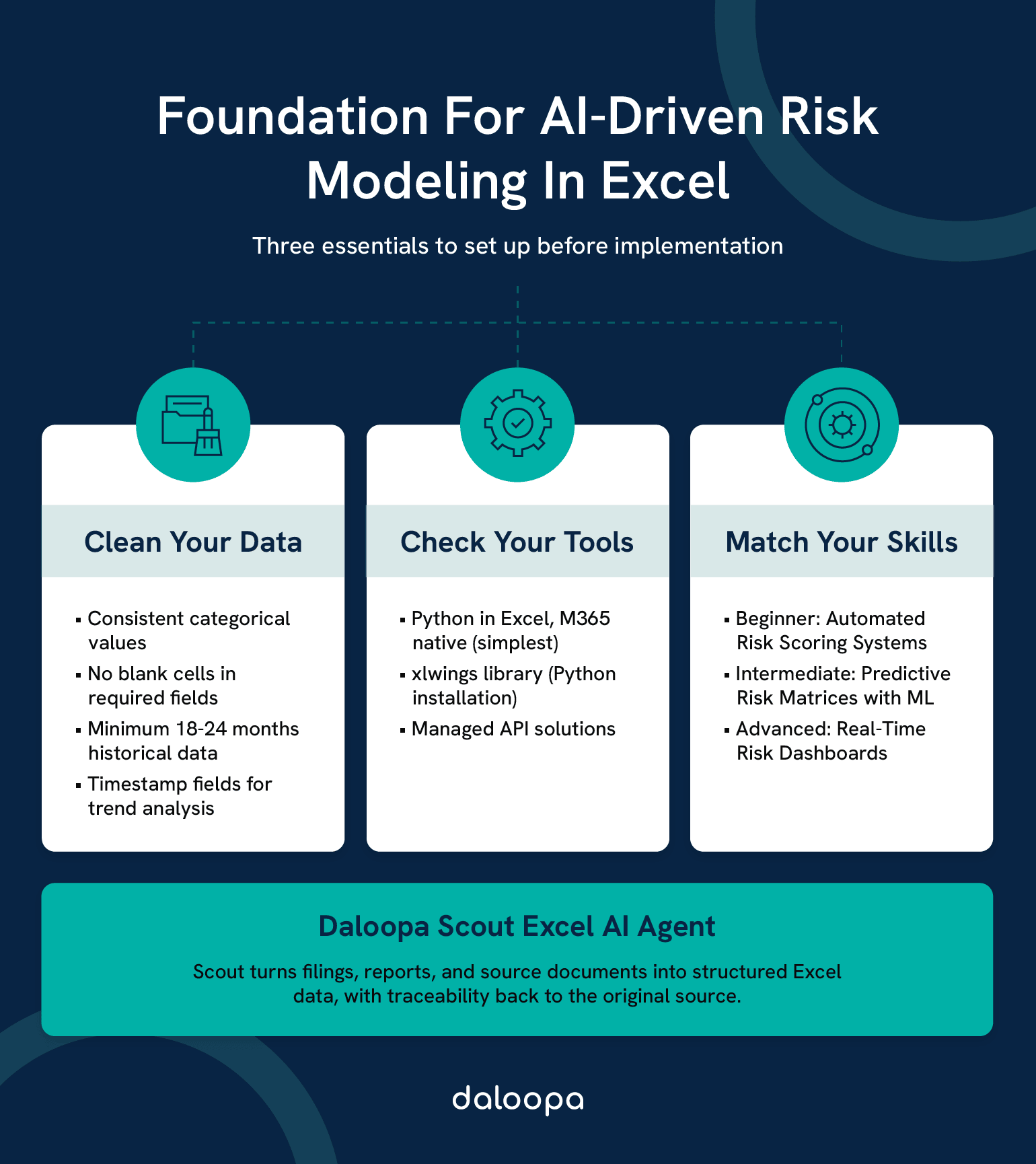
The most common cause of failed AI risk implementations isn’t algorithm selection or technical complexity—it’s inadequate data preparation. Before writing your first formula, ensure your foundation supports what you’re building.
Shortcut for Clean Financial Data: If your risk models depend on fundamental financial data—supplier financials, counterparty metrics, industry benchmarks—Daloopa eliminates the data preparation bottleneck entirely. Pre-validated, structured financial data flows directly into your models without the cleaning and normalization overhead that typically consumes 80% of analyst time.
Data Requirements and Preparation
The fundamental rule: garbage in, garbage out. AI models amplify data quality, for better or worse. A machine learning model trained on inconsistent, incomplete, or outdated risk data produces confidently wrong predictions.
Required data structure for AI-ready risk assessment:
| Column | Purpose | Data Type | Example |
| Risk_ID | Unique identifier | Text/Number | R-2024-0142 |
| Category | Risk taxonomy classification | Categorical | Operational, Financial, Strategic, Compliance |
| Description | Plain-language risk statement | Text | Supplier concentration in single geographic region |
| Likelihood | Probability assessment (1-5 scale) | Integer | 3 |
| Impact | Consequence severity (1-5 scale) | Integer | 4 |
| Velocity | Speed of onset if risk materializes | Categorical | Rapid, Moderate, Slow |
| Detectability | Ease of early warning detection | Integer (1-5) | 2 |
| Current_Controls | Existing mitigation measures | Text | Dual-sourcing policy, quarterly supplier reviews |
| Residual_Score | Post-control risk rating | Calculated | 8.4 |
| Owner | Accountable individual | Text | J. Martinez, Procurement |
| Last_Updated | Data currency timestamp | Date | 2024-11-15 |
| Status | Risk lifecycle stage | Categorical | Active, Monitoring, Closed |
Power Query for data transformation. If your risk data lives in multiple sources—incident databases, financial systems, external feeds—Power Query provides the extraction and transformation layer. Think of it as Excel’s built-in tool for connecting to external sources, cleaning inconsistencies, and automating refresh cycles. Master the basics before attempting real-time dashboards.
Data quality checklist before proceeding:
- Consistent categorical values (no “Financial” vs “Finance” vs “Fin”)
- No blank cells in required fields
- Likelihood and Impact scores using consistent scales
- Historical data spanning at least 18-24 months for ML training
- Timestamp fields enabling trend analysis
Tools and Integrations You’ll Need
Excel version considerations. Microsoft 365 provides the fullest feature set for AI integration, including Python in Excel, dynamic arrays, and Power Query’s latest connectors. Excel 2019 and 2021 support most core functionality but lack some automation features. Excel 2016 and earlier will limit your options significantly.
Python integration options. For predictive models (Model 2), you’ll need Python connectivity. Three primary approaches exist:
- Python in Excel (Microsoft 365): Native integration now generally available for Enterprise and Business users on Windows and Excel for the web.⁴ Runs Python directly in cells. The simplest option for organizations with qualifying subscriptions.
- xlwings: Open-source library connecting Python scripts to Excel workbooks. Requires local Python installation. Good for intermediate users comfortable with basic scripting.
- Managed API solutions: External services handling ML model deployment, delivering results via Excel-compatible connections. Higher cost, lower technical barrier.
For teams seeking seamless AI-to-Excel connectivity without managing Python infrastructure, the Model Context Protocol for AI integration provides a standardized approach to connecting AI models with existing data workflows.
Skills Assessment: Matching Models to Your Expertise
Honest self-assessment prevents frustration. Not every model suits every skill level.
Beginner (Excel fundamentals + basic formulas):
- Start with Model 1 (Automated Risk Scoring) using native Excel functions.
- Build toward conditional formatting automation, basic Power Query connections.
- Skill gaps to address: VLOOKUP/XLOOKUP, nested IF statements, named ranges
Intermediate (Advanced Excel + Power Query + scripting awareness):
- Start with Model 1 with full automation, Model 3 basic dashboard.
- Build toward Power Query M language, basic Python syntax.
- Skill gaps to address: Data modeling concepts, API fundamentals
Advanced (Excel + Python + data analysis experience):
- Start with any model at full implementation.
- Build toward custom ML model training, real-time streaming integrations.
- Skill gaps to address: ML algorithm selection, model validation techniques
Beyond DIY Implementation: For teams ready to operationalize AI-driven risk intelligence without managing Python environments, API connections, and model training infrastructure, Daloopa Scout our AI excel financial copilot provides the foundation—validated financial data, pre-built integrations, and AI-ready workflows that compress months of setup into days.
Example 1: Building an Automated Risk Scoring System in Excel Example Step by Step
This walkthrough covers Model 1—the most accessible entry point for AI-augmented risk management. By the end, you’ll have a functioning automated risk register that scores, prioritizes, and visualizes risks without manual calculation.
Step 1: Setting Up Your Risk Register
A risk register is your structured inventory of identified risks—the foundation for everything that follows. If you have an existing register, adapt it to this structure. If starting fresh, this template provides an AI-ready foundation.
Create a new worksheet with these columns:
| A | B | C | D | E | F | G | H | I | J |
| Risk_ID | Category | Description | Likelihood (1-5) | Impact (1-5) | Velocity | Raw_Score | Weight_Factor | Adjusted_Score | Priority_Flag |
Column definitions:
- Risk_ID: Unique identifier with consistent naming (e.g., OPS-2024-001)
- Category: Risk taxonomy—keep to 5-7 categories maximum for meaningful analysis
- Likelihood: Probability on 1-5 scale (1=Rare, 5=Almost Certain)
- Impact: Consequence severity on 1-5 scale (1=Negligible, 5=Catastrophic)
- Velocity: How quickly impact would be felt (Rapid/Moderate/Slow)
- Raw_Score: Basic Likelihood × Impact calculation
- Weight_Factor: AI-derived adjustment based on historical patterns
- Adjusted_Score: Raw_Score × Weight_Factor
- Priority_Flag: Automated HIGH/MEDIUM/LOW classification
What you should see: A structured table with headers in row 1, ready for data entry starting in row 2.
Step 2: Creating AI-Enhanced Risk Scoring Formulas
The basic risk score—Likelihood × Impact—provides a starting point but misses nuance. AI enhancement adds weighted factors reflecting how risks actually behave in your organization.
Basic scoring formula (Column G – Raw_Score):
=D2*E2
Weight factor formula (Column H – Weight_Factor):
This is where AI enhancement enters. The weight factor adjusts raw scores based on velocity and historical patterns. Start with this rule-based approach:
=IF(F2=”Rapid”,1.3,IF(F2=”Moderate”,1.0,0.8))
This formula increases scores for rapid-onset risks (less response time) and decreases scores for slow-developing risks (more mitigation opportunity).
Advancing to true AI enhancement: The rule-based formula above is a starting point. True AI enhancement analyzes your historical data to answer key questions: which risks with specific characteristics actually materialized? A logistic regression model trained on past incidents generates probability-based weight factors reflecting your organization’s actual risk profile—not generic assumptions.
For organizations with 2+ years of historical risk data, the weight factor becomes:
=PREDICTED_PROBABILITY_FROM_ML_MODEL(risk_characteristics)
We cover ML integration in the Advanced section (Model 2).
Adjusted score formula (Column I):
=G2*H2
Priority flag formula (Column J):
=IF(I2>=15,”HIGH”,IF(I2>=8,”MEDIUM”,”LOW”))
Calibrate thresholds (15, 8) to your organization’s risk appetite. These defaults assume a 5×5 matrix where scores range from 1-25.
What you should see: Columns G through J calculating automatically as you enter data in columns D, E, and F.
Step 3: Automating with Conditional Formatting and Macros
Visual indicators accelerate comprehension. When leadership scans your register, color-coding should communicate priority before they read a single number.
Conditional formatting for priority visualization:
- Select the Priority_Flag column (J2:J500 or your expected range)
- Home → Conditional Formatting → New Rule → “Format only cells that contain”
- Create three rules:
- Cell value equals “HIGH” → Red fill, white bold text
- Cell value equals “MEDIUM” → Yellow fill, black text
- Cell value equals “LOW” → Green fill, black text
Heat map for Adjusted_Score column:
- Select the Adjusted_Score column (I2:I500)
- Home → Conditional Formatting → Color Scales
- Select red-yellow-green gradient (red = highest values)
Basic macro for automated refresh:
For risk registers connected to external data sources, this macro triggers recalculation and timestamps the refresh:
Sub RefreshRiskScores()
‘ Recalculate all formulas
Application.CalculateFull
‘ Update timestamp in designated cell
Range(“M1”).Value = “Last Updated: ” & Now()
‘ Optional: Auto-save after refresh
‘ ActiveWorkbook.Save
End Sub
To implement: Developer tab → Visual Basic → Insert Module → Paste code → Close editor. Run via Developer → Macros → RefreshRiskScores.
What you should see: Risk entries color-coded by priority with heat map visualization on scores.
Step 4: Validating Your Risk Scoring Model
A scoring system only has value if it accurately reflects actual risk levels. Validation ensures your model works before you rely on it for decisions.
Historical back-testing:
If you have records of past risks that materialized:
- Pull historical risk register data from 12-24 months ago.
- Calculate what scores your new model would have assigned.
- Compare against which risks actually materialized.
- A well-calibrated model shows correlation between high scores and materialized risks.
Calibration metric (Brier score simplified):
The Brier score measures how well probability predictions match outcomes—a standard metric in probability forecasting since its introduction by meteorologist Glenn Brier in 1950. Did risks you scored highly actually happen more often than risks you scored low?
Calculate: Average of (predicted probability – actual outcome)² across all historical risks
- Scores closer to 0 = better calibration
- Scores approaching 0.25 = no better than random (equivalent to always predicting 50% probability)
If your model consistently rates risks as “high” that never materialize, or misses risks that do, adjust your likelihood scales or weight factors.
Documentation for audit trail:
Create a methodology document capturing:
- Scoring scale definitions (what does “Likelihood = 4” mean specifically?)
- Weight factor rationale and data sources
- Calibration results and adjustment history
- Approved threshold values and approvers
This documentation isn’t bureaucratic overhead—it’s what allows your risk scoring to withstand audit scrutiny and organizational transitions.
Once you’ve mastered automated scoring, predictive matrices offer the next level of risk intelligence.
Example 2: Advanced Predictive Risk Matrices with Machine Learning in Excel
Model 2 moves beyond current-state assessment into forecasting. This section requires intermediate technical comfort—if Python syntax is unfamiliar, consider building proficiency with Model 1 first or explore managed solutions that deliver ML capabilities without coding.
From Static Risk Matrices to Predictive Models
Traditional risk matrices—the familiar likelihood-by-impact grids—capture a snapshot. They tell you where risks sit today. They cannot tell you which risks are trending toward escalation or which “medium” risks share characteristics with past risks that became critical.
The limitation of 5×5 matrices:
Standard matrices treat all “Medium-High” risks (say, Likelihood 3, Impact 4) as equivalent. But historical data often reveals patterns: supplier risks with specific characteristics escalated 60% of the time, while technology risks with similar scores escalated only 15%. Static matrices miss these distinctions entirely.
What predictive models add:
Machine learning analyzes your historical risk data to identify which factor combinations preceded materialized risks. The output is a probability score—”risks with this profile have historically materialized 73% of the time”—augmenting your matrix assessment.
Use case: Your register shows 15 risks currently scored “Medium” (scores 8-12). A predictive model identifies that 3 share characteristics with past risks that escalated rapidly. Those 3 get flagged for immediate attention despite their “medium” static score.
Choosing the Right Algorithm for Your Risk Data
Match algorithm selection to your data characteristics and interpretability requirements.
| Algorithm | Best For | Complexity | Interpretability | Data Requirements |
| Logistic Regression | Binary outcomes (will risk materialize: yes/no) | Low | High—coefficients show factor importance | 200-500+ historical records |
| Decision Trees | Categorical classification, visual rule explanation | Low-Medium | High—generates readable rules | 100+ records per category |
| Random Forest | Higher accuracy, handling many variables | Medium | Medium—feature importance available | 500+ historical records |
| Neural Networks | Complex pattern detection, large datasets | High | Low—”black box” challenge | 1000+ records, many features |
Recommendation for most risk teams: Start with logistic regression. The interpretability advantage is substantial—you can explain to stakeholders exactly which factors drive predictions. “Black box” models often face organizational resistance when people can’t understand why a risk is flagged.
Logistic regression in plain terms: The algorithm finds a formula predicting the probability of an outcome (risk materializing) based on input factors (category, velocity, control effectiveness). The output is a number between 0 and 1 representing probability.
Decision trees in plain terms: The algorithm creates a flowchart of yes/no questions classifying risks. “Is category = Financial? If yes, is velocity = Rapid? If yes, high probability of materialization.” Easy to explain, easy to validate.
Deploying ML Models in Excel via Python Integration
This section assumes Python is installed and you’ve selected an integration method (xlwings, Python in Excel, or API-based).
Step 1: Prepare training data export
From your risk register, export historical data including:
- All risk factor columns (Category, Likelihood, Impact, Velocity, etc.)
- Outcome column: Did the risk materialize? (1 = yes, 0 = no)
- Minimum 18-24 months of data for meaningful patterns
Save as CSV for Python import.
Step 2: Train a basic logistic regression model
import pandas as pd
from sklearn.linear_model import LogisticRegression
from sklearn.model_selection import train_test_split
# Load historical risk data
df = pd.read_csv(‘risk_history.csv’)
# Define features and target
features = [‘Likelihood’, ‘Impact’, ‘Velocity_Encoded’, ‘Category_Encoded’]
X = df[features]
y = df[‘Materialized’]
# Split data for validation
X_train, X_test, y_train, y_test = train_test_split(X, y, test_size=0.2)
# Train model
model = LogisticRegression()
model.fit(X_train, y_train)
# Check accuracy
accuracy = model.score(X_test, y_test)
print(f”Model accuracy: {accuracy:.2%}”)
What this code does: Loads your historical risk data, separates it into training and testing sets, trains a logistic regression model on training data, then checks how well it predicts outcomes on data it hasn’t seen.
Step 3: Generate predictions for current risks
# Load current risk register
current_risks = pd.read_csv(‘current_risks.csv’)
# Generate probability predictions
current_risks[‘Escalation_Probability’] = model.predict_proba(current_risks[features])[:,1]
# Export back to Excel
current_risks.to_excel(‘risks_with_predictions.xlsx’, index=False)
Step 4: Import predictions to Excel
Open the exported file. The Escalation_Probability column now contains ML-generated predictions (0-1 scale) for each current risk.
Validation requirements: Before relying on predictions, verify model performance:
- Accuracy above 70% on test data (higher is better).
- Compare training vs. test accuracy to check for overfitting.
- Validate that predictions make intuitive sense for known high-risk items.
For teams seeking ML-powered risk insights without managing Python infrastructure and model deployment, AI-powered risk analysis without coding provides accessible alternatives delivering predictive capabilities through managed services.
Visualizing Predictions with Heat Maps
Probability predictions are most useful when visualized alongside traditional matrix views.
Creating a predictive risk heat map:
- Create a PivotTable from your risk data with predictions
- Rows: Impact levels (1-5)
- Columns: Likelihood levels (1-5)
- Values: Average of Escalation_Probability
This produces a matrix where each cell shows average ML-predicted escalation probability for risks in that likelihood/impact combination.
Adding confidence intervals:
For sophisticated visualization, include prediction confidence alongside probability:
- High confidence (model has seen many similar risks): Solid color
- Low confidence (limited historical data for this profile): Hatched pattern
What you should see: A heat map resembling a traditional risk matrix but incorporating forward-looking ML predictions rather than just current assessment.
With predictive capabilities established, real-time dashboards bring everything together for leadership visibility.
Example 3: Real-Time Risk Dashboards: AI-Powered Visibility for Leadership
Model 3 addresses the communication challenge risk leads consistently identify: translating technical risk data into formats that drive executive attention and action. This isn’t about impressing with visuals—it’s about enabling faster, better decisions.
Designing Dashboards That Decision-Makers Actually Use
The most sophisticated dashboard is worthless if leadership doesn’t look at it. Design for how executives actually consume information, not for what analysts find intellectually satisfying.
What leadership actually wants to see:
- Top 5-10 risks requiring attention — Not a comprehensive 200-item list
- What changed since last review — New, escalated, and resolved risks
- Trend direction — Is overall risk posture improving or deteriorating?
- Action requirements — What decisions do they need to make right now?
What leadership doesn’t want:
- Comprehensive inventories requiring 20 minutes to parse
- Technical metrics without business context
- Data without recommended actions
- Static snapshots duplicating last month’s report
Cognitive load reality:
Cognitive psychologist George Miller’s foundational research established that working memory holds approximately 7 ± 2 items simultaneously—a limit subsequent research by Nelson Cowan refined to approximately 4 items for pure capacity.⁵ Dashboards exceeding this threshold force executives to re-read content repeatedly. Design implications:
- Maximum 5-7 key metrics on primary view
- Progressive disclosure for detail (drill-down, not all-at-once)
- Clear visual hierarchy directing attention flow
Common dashboard mistakes:
- Information density overload: Every metric crammed onto one screen
- Color chaos: Too many colors without consistent meaning
- Missing the “so what”: Data without interpretation or recommended action
- Stale data presented as current: Erodes trust in entire dashboard
Connecting Live Data Sources to Excel
Real-time dashboards require real-time data connections. Excel supports several approaches depending on your infrastructure.
Power Query for live database connections:
- Data → Get Data → From Database (select your source type)
- Enter connection credentials
- Select tables/queries to import
- Configure refresh: Data → Queries & Connections → Properties → Refresh every X minutes
API connections for external data:
For risk indicators from external sources (financial markets, weather systems, economic indicators):
- Data → Get Data → From Web
- Enter API endpoint URL (may require authentication tokens)
- Transform response using Power Query
- Schedule refresh
Practical refresh rates:
| Data Type | Appropriate Refresh | Rationale |
| Financial market data | 15-60 minutes | Sub-minute rarely necessary for risk management |
| Operational incidents | 5-15 minutes | Timely awareness enables response |
| Internal risk assessments | Daily or on-change | Manual inputs don’t change continuously |
| External risk feeds | Hourly to daily | Depends on feed update frequency |
Performance note: Each refresh consumes resources. Too many rapid-refresh connections make dashboards slow and unstable. Prioritize frequency for highest-value data streams.
Embedding AI-Driven Insights and Alerts
The difference between a “dashboard” and an “AI-powered dashboard” is automated intelligence surfacing patterns humans would miss or find too slowly.
Patterns humans miss:
- Gradual drift: A risk score increasing 0.2 points weekly—individually insignificant, but a 40% increase over five months
- Correlation clustering: Three seemingly unrelated risks sharing a common root cause
- Historical echoes: Current risk profile resembling conditions that preceded a past incident
Alert configuration:
Configure automated alerts based on:
- Absolute thresholds: Any risk score exceeding 18 triggers immediate notification
- Relative change: Any risk increasing more than 25% in 30 days triggers review flag
- Anomaly detection: Any score deviating more than 2 standard deviations from historical average
Natural language summaries:
Large language models translate numerical risk data into executive-ready narratives:
Example: “Risk posture this week: 3 risks require immediate attention. Supplier concentration risk (OPS-2024-089) escalated from Medium to High following single-source dependency identification. Two new compliance risks added following regulatory guidance update. Overall portfolio risk score: 7.2, up from 6.8 last week, driven primarily by supply chain category.”
For organizations exploring LLM applications in risk communication, LLM integration for financial analysis provides deeper exploration of language model capabilities.
From Dashboard to Decision: Enabling Action
A dashboard providing visibility without enabling action is an expensive screensaver. Design for the transition from awareness to response.
Drill-down capabilities:
Every summary metric should support one-click expansion to underlying detail:
- “3 risks escalated” → Click to see which three, why, who owns response
- “Supply chain category: elevated” → Click for specific supplier risks, concentration analysis, mitigation status
Clear pathways from insight to action:
Each flagged item should include:
- Owner: Who is accountable for response
- Recommended action: What specifically should happen next
- Escalation path: If owner doesn’t respond within X days, who gets notified
Decision support, not decision replacement:
AI-powered dashboards inform human judgment; they don’t replace it. Design elements should make clear:
- What the AI is confident about vs. uncertain about
- Where human review is required before action
- How to override or adjust AI-generated recommendations
With your models built, let’s address the pitfalls that derail even well-designed implementations.
Avoiding Common Pitfalls in AI Risk Assessment Models
Technical implementation is the easier part. Organizational and operational challenges cause more failures than algorithm selection. Address these proactively.
Data Quality Issues That Derail AI Models
AI models are only as reliable as the data they’re trained on. Three problems consistently undermine accuracy.
- Inconsistent categorization: “Operational” sometimes labeled “Operations” or “Ops”? Your model learns from noise rather than signal. Establish and enforce a controlled vocabulary.
- Survivorship bias: Historical data likely overrepresents risks that were identified and tracked—and underrepresents risks that materialized without warning. ML models trained on incomplete history may miss entire risk categories.
- Temporal data decay: Risk assessments from three years ago may reflect conditions no longer relevant. Weight recent data more heavily, and periodically audit whether historical patterns still apply.
Prevention through governance:
- Implement dropdown-based entry (no free text for categorical fields)
- Require monthly data quality audits
- Establish data steward accountability
- Document data lineage and transformation logic
Model Transparency: Explaining AI Decisions to Stakeholders
A model flagging risks without explanation generates resistance, not adoption. Stakeholders need to understand why before they trust recommendations.
The “black box” problem:
Complex models often cannot explain predictions in human terms. “The model says this risk will escalate” isn’t acceptable justification for resource allocation.
Explainability techniques for business audiences:
- SHAP values (simplified): SHAP (SHapley Additive exPlanations) assigns each feature an importance value for a particular prediction, unifying various feature importance methods through Shapley values from cooperative game theory.⁶ Instead of “70% escalation probability,” you say: “70% probability, driven by high velocity (+25%), supplier category (+20%), and weak control rating (+15%).”
- Rule extraction: For decision tree models, extract actual decision rules in business language: “Supplier category risks with Velocity = Rapid and Control Effectiveness < 3 have historically escalated 82% of the time.”
- Counterfactual explanations: “This risk is flagged because Impact = 5. If Impact were 3, the model would classify it medium priority.” Helps stakeholders understand what would need to change.
Documentation for audit and compliance:
- Maintain model version history with change rationale.
- Log all predictions with supporting factor values.
- Record when humans override AI recommendations (and outcomes).
- Conduct quarterly model validation reviews minimum.
Knowing When Excel Isn’t Enough
Excel-based AI risk models serve well up to a point. Recognizing limits prevents frustration and positions you for successful transition when needed.
Technical scaling thresholds:
| Indicator | Excel-Appropriate | Consider Alternatives |
| Risk register rows | Up to 5,000 | 10,000+ |
| Concurrent users | 1-3 | 5+ |
| Data refresh frequency | Hourly+ | Sub-minute |
| Data sources connected | 5-10 | 20+ |
| ML model complexity | Logistic regression, decision trees | Deep learning, ensembles |
| Calculation time | Under 30 seconds | Minutes |
Organizational thresholds:
- Multiple teams need real-time access to same data.
- Audit requirements demand version control beyond Excel’s capabilities.
- Integration requirements exceed Power Query’s connection options.
- Model governance needs exceed practical spreadsheet management.
Transition paths:
Rather than wholesale migration, consider hybrid approaches:
- Keep Excel as interface; move data and calculations to backend systems.
- Use Excel for ad-hoc analysis; move production dashboards to dedicated tools.
- Maintain Excel for familiar workflows; add API connections to enterprise systems.
When Excel limitations emerge, enterprise-grade AI risk management solutions preserve workflow investments while adding scalability and governance capabilities spreadsheets can’t match.
Understanding current limitations helps you plan for what’s coming next.
The Future of AI-Driven Risk Management in Excel
The capabilities in this guide represent current leading practices. AI development trajectory suggests significantly expanded possibilities within 2-3 years. Understanding these trends helps you build with future compatibility in mind.
LLMs and Contextual Risk Intelligence
Large language models are transforming how risk professionals interact with data and documentation.
Current practical applications:
- Document analysis: LLMs review contracts, regulatory filings, and reports to identify risk-relevant information that would take humans hours to extract.
- Risk narrative generation: Converting quantitative data into written summaries for stakeholder communication.
- Q&A interfaces: Natural language queries against risk databases (“Which suppliers have had incidents in the past 6 months?”)
Current limitations:
- Accuracy varies—LLM outputs require human verification for risk-critical applications.
- Regulatory guidance on AI use in risk management still evolving.
- Integration with Excel remains in early stages.
Realistic timeline: Organizations with strong data foundations can begin LLM integration now for non-critical applications. Production-grade deployment for risk-critical processes likely 12-24 months for most organizations as tooling matures.
For deeper exploration, LLM integration for financial analysis provides current implementation guidance.
Real-Time Risk Detection at Scale
The definition of “real-time” is compressing. Today’s leading practice becomes tomorrow’s baseline.
Emerging capabilities:
- IoT integration: Manufacturing and operational risks monitored through continuous sensor feeds
- Alternative data: Social media sentiment, satellite imagery, and transaction patterns as risk indicators
- Cloud-based Excel: Microsoft 365 enabling true multi-user collaboration and cloud-native integrations
What “real-time” may mean in 2-3 years:
Today, “real-time” typically means hourly refreshes with daily model updates. Within 2-3 years, expect:
- Streaming data integration standard for operational risks
- Continuous model retraining as new data arrives
- Predictive horizons extending from weeks to months
Your Competitive Advantage: Why Acting Now Matters
Risk professionals building AI capabilities today gain compounding advantages.
Early adopter benefits:
- Institutional learning: Organizations starting now develop expertise before AI tools become table stakes.
- Data accumulation: ML models improve with historical data; starting earlier means more training data.
- Stakeholder trust: Building track record while stakes are lower.
Skill development priorities:
If building toward AI-augmented risk management, prioritize:
- Data literacy: Understanding data quality, governance, and analytical thinking
- Basic Python: Enough to understand what’s possible and communicate with technical teams
- ML concepts: Not implementation details, but understanding what algorithms can and cannot do
- Business translation: Converting technical insights into executive communication
Start Building AI Risk Assessment Models Today
AI-driven risk assessment in Excel isn’t a future possibility—it’s a current capability waiting for implementation. The three models outlined in this guide address the core challenges risk professionals face: manual processes consuming analyst time, reactive assessment missing emerging threats, and leadership demanding real-time visibility.
Automated Risk Scoring Systems eliminate the manual calculation burden that introduces errors into 94% of business spreadsheets. With proper setup, your register updates instantly when underlying factors change, freeing hours previously lost to formula auditing and version reconciliation.
Predictive Risk Matrices shift your function from reactive documentation to proactive forecasting. Machine learning trained on your historical data identifies which risks are trending toward escalation—transforming “medium” scores into actionable intelligence before problems materialize.
Real-Time Dashboards bridge the gap between technical risk data and executive action. AI-generated insights surface patterns humans miss, while natural language summaries translate complexity into decisions.
The path forward isn’t abandoning Excel expertise developed over years—it’s augmenting that expertise with AI capabilities handling what spreadsheets alone cannot. Start with Model 1 if you’re new to this space. The automated scoring system can be functional within hours and delivers immediate value through time savings and error reduction. Build from there as your confidence and data foundation grow.
Ready to scale beyond what’s possible in spreadsheets?
Whether you’re building your first automated scoring system or ready to deploy predictive models at scale, Daloopa provides the AI-powered foundation that transforms Excel-based risk management into enterprise-grade intelligence. See how Daloopa Scout can accelerate your AI risk assessment capabilities.
References
- Poon, Pak-Lok, et al. “Spreadsheet Quality Assurance: A Literature Review.” Frontiers of Computer Science, vol. 18, no. 2, 2024. DOI: 10.1007/s11704-023-2384-6.
- Association for Financial Professionals. “2025 AFP FP&A Benchmarking Survey Report: Technology & Data.” Association for Financial Professionals, 2025.
- Pragmatic Institute. “Overcoming the 80/20 Rule in Data Science.” Pragmatic Editorial Team, 2024.
- Microsoft. “Python in Excel Availability.” Microsoft Support, 2025.
- Miller, George A. “The Magical Number Seven, Plus or Minus Two: Some Limits on Our Capacity for Processing Information.” Psychological Review, vol. 63, no. 2, 1956, pp. 81-97.
- Lundberg, Scott M., and Su-In Lee. “A Unified Approach to Interpreting Model Predictions.” Advances in Neural Information Processing Systems (NeurIPS), vol. 30, 2017, pp. 4768-4777.